Windows Image Management for Gaming PCs
Windows image management for gaming PCs means maintaining one master Windows installation — a golden image — and deploying it across multiple machines instead of managing separate local installations. With a shared image as the baseline, updates and configuration changes can be managed centrally, while individual PCs can be restored to a known state when needed.
ggRock, the diskless boot platform from ggCircuit, uses this approach to manage gaming PC fleets. Machines PXE-boot from a shared image stored on an on-premise server, while operators manage images, snapshots, writeback, and retention from one console. This guide explains how these tools work and how venues use them in daily operations.
One Golden Image for the Whole Fleet
A golden image is a master Windows installation that contains the software your venue needs: system settings, drivers, peripherals, game launchers, anti-cheat tools, and the venue client. Gaming PCs boot from this shared image over the network, allowing operators to maintain a consistent baseline across the floor.
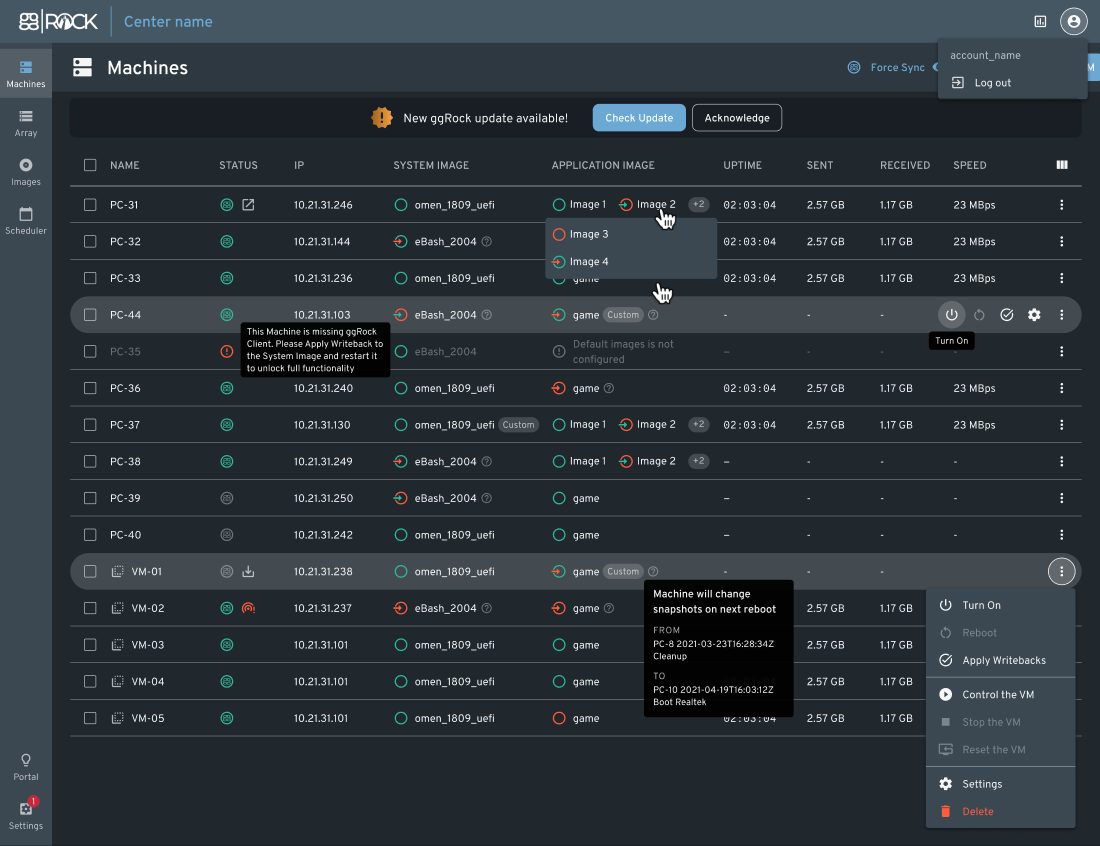
With changes reverted after reboot by default, each station can return to a clean starting point for the next session. Operators can manage images, snapshots, and machine settings from the the machines view, including assigning images and performing remote machine actions without visiting every PC.
Why OS and Game Images Are Managed Separately
ggRock separates OS images and game images because they serve different purposes and change at different speeds. Windows configurations may stay stable for long periods, while game libraries are updated frequently. Keeping them separate makes it easier to manage changes without rebuilding the entire environment.
For venue operators, this means game updates can be prepared and deployed without repeating the full OS setup process. The result is a more efficient update workflow, with less manual work across every machine on the floor.
Snapshots and Rollback
A snapshot records the state of an image at a specific point in time. In ggRock, operators can create a snapshot after making changes such as installing updates, adjusting settings, or adding software. That snapshot can then be assigned to other machines, allowing changes to be tested and deployed from a central workflow.
Snapshots also make testing safer. If a change causes problems, operators can return machines to a previous snapshot instead of rebuilding the image from scratch. The rollback process restores a previously saved configuration and gives teams a reliable way to manage updates across the venue.
- Create snapshots before major changes to preserve a working version
- Test updates on one machine before assigning the snapshot across the fleet
- Roll back to a previous snapshot when a change needs to be reverted
Keep-Writeback: Persist Only the Changes You Choose
Reverting changes on reboot is ideal for customer-facing machines, but maintenance tasks often require changes to be saved. ggRock handles this with keep-writeback, a per-PC setting that allows selected machines to retain their changes instead of discarding them.
This gives operators control over where changes persist. A maintenance machine can keep updates long enough to create a new snapshot, while every other PC on the floor keeps reverting on reboot, protecting both security and data integrity while you work.
Testing Changes While the Venue Stays Open
Image management is most valuable when updates can be tested without affecting the whole venue. Because snapshots can be assigned per machine, operators can test a new configuration on one or two stations while the rest of the floor continues running from the current image.
ggRock also supports running an image in a virtual machine on the server, allowing teams to prepare and test changes without taking a customer-facing PC offline. Combined with the boot scheduler for automated startup and shutdown, routine maintenance can be planned around venue hours.
Mixed Hardware Without Extra Images: Seamless Boot
Most gaming venues have a mix of hardware. New PC batches, upgraded components, and different performance tiers can make image management more complicated if every configuration requires its own setup.
ggRock's Seamless Boot helps simplify mixed hardware environments by detecting network adapters on new configurations and installing the required drivers automatically. This allows venues to use a shared golden image across different generations of machines while keeping hardware changes easier to manage. ggRock also shares computer names, hardware information, and configuration with ggLeap, so both the imaging and management systems work with the same view of the venue.
Retention Settings: Controlling Snapshot History
Every snapshot uses server storage, so managing snapshot history is an important part of long-term image maintenance. ggRock's retention settings let operators decide how much history to keep, balancing available storage with the ability to restore previous configurations when needed. Combined with disk array management, this helps keep image storage organised as the venue grows.
Start Your Free 30-Day Trial
Start with a free 30-day ggLeap trial — every feature included, no credit card required — and talk to our team about testing ggRock alongside your current setup.
Frequently Asked Questions
Get Started with ggCircuit
Get more information about our esports solutions