Update Games on Hundreds of PCs From One Master Image
The way to update games on hundreds of PCs at once is to stop storing games on each PC. With diskless boot software, every machine runs from one shared disk image on an on-premise server, so you patch a game once on that image, capture a snapshot, and every station boots the new version on its next restart — no per-machine downloads and no staff walking the floor.
Every venue operator knows the alternative routine: a major title ships a patch overnight, and suddenly every gaming PC needs the same multi-gigabyte download before doors open. At five machines that is an annoyance; at fifty or five hundred it eats staff hours, saturates bandwidth, and still leaves stations out of sync when customers arrive.
ggRock, the diskless boot platform from ggCircuit, is built on that shared-image model. This page explains the mechanics — master images, snapshots, scheduled reboots — and the option of having ggCircuit's SpecOps team handle daily updates for you.
Why Per-PC Game Updates Fail at Scale
When every PC owns a local copy of every game, every patch is a per-machine event, and trying to update games on hundreds of PCs this way scales linearly: each additional station adds another download, another install, another verification pass, and another chance for something to go wrong. Four failure modes show up again and again in venues that update locally.
- Time: staff touch every machine, and patch windows stretch into hours of repetitive work
- Bandwidth: dozens or hundreds of PCs pulling the same patch from the internet saturate the venue connection while customers are trying to play
- Inconsistency: some machines finish, some stall mid-download, and mismatched game versions stop players from queueing together
- Staffing: someone stays after close or arrives before open to babysit update queues instead of doing revenue-generating work
One Master Image Instead of Hundreds of Local Installs
With ggRock, gaming PCs do not boot from local drives. Each machine PXE-boots a shared disk image streamed from an on-premise server, so the operating system, drivers, and game library exist in one place. To update games on hundreds of PCs, you patch the image once: the download happens one time on one machine, and every station that boots from that image runs the updated version.
Because the image is the single source of truth, version drift disappears. There is no machine that missed the patch, no half-finished install on station 47, and no staff member walking the floor with a checklist. The update is applied venue-wide with no per-PC intervention.
How Snapshot-Based Propagation Works
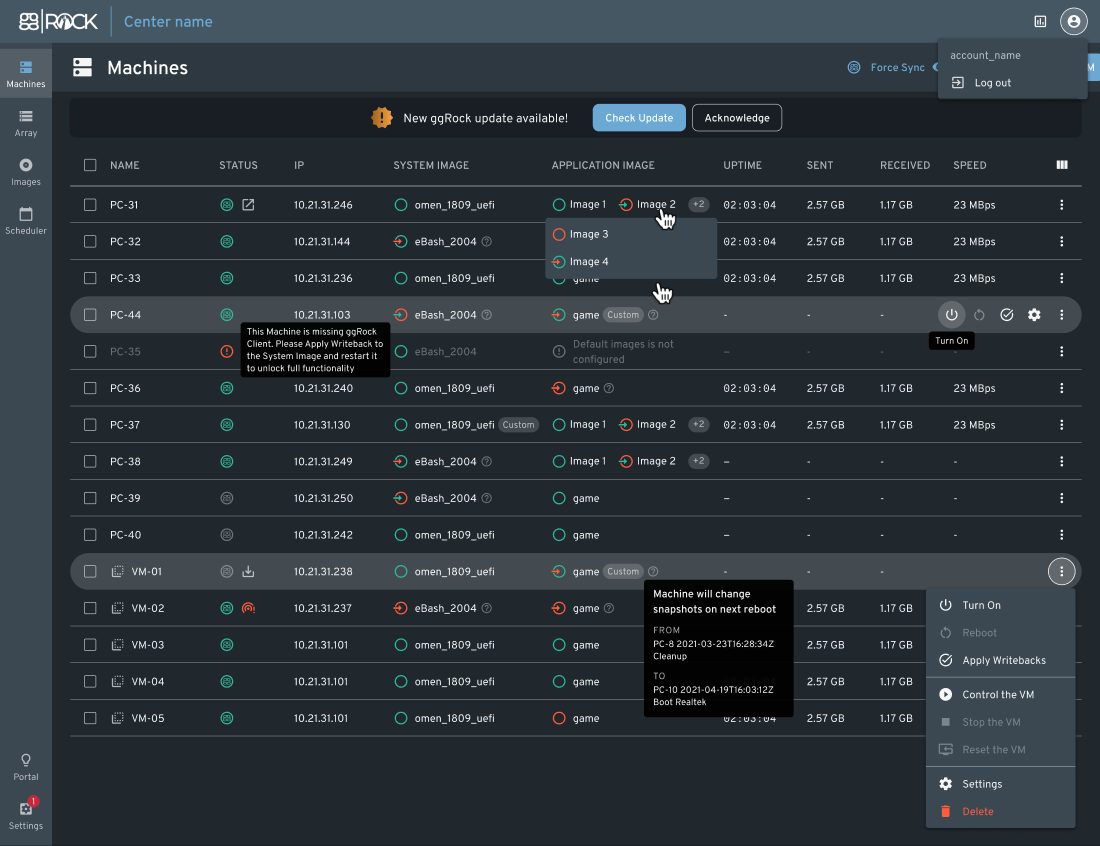
ggRock manages change through snapshots. The typical workflow: an admin boots one designated machine, lets the game client download and install the patch, verifies the game launches, then captures the result as a snapshot. From the machines management view, that snapshot is assigned to the rest of the floor, and each PC picks up the change on its next boot.
Snapshots also give you an undo button. If a patch introduces a problem — a broken anti-cheat driver, a launcher regression — you roll the floor back to the previous snapshot instead of troubleshooting hundreds of machines. Retention settings control how much snapshot history the server keeps, and per-PC writeback means anything a customer changes during a session reverts on reboot, so every machine returns to a known-good state for the next player.
Scheduling Reboots and Update Windows
Propagating a snapshot still requires a reboot, and rebooting a floor full of paying customers is not an option. ggRock's boot scheduler handles the timing: schedule machines to power off after close, reboot into the updated image, and power back on before open, with no one on site. Machines management adds manual power on, off, and reboot controls plus network monitoring when you need to intervene directly.
For the patching work itself, ggRock supports virtual machines for remote maintenance. An admin can boot the image in a VM on the server, run the game updates, and capture the snapshot without ever launching a physical PC — useful when a patch lands at midnight and the venue is locked.
Daily Game Updates Done for You
Even with the mechanics centralized, someone still has to watch for patches and keep the image current. Under a Managed Services Agreement, ggCircuit's SpecOps Managed Services Team takes that on: daily game updates handled for you, so the image is patched and the floor is ready before you open. The same team offers on-site installation support for new deployments, and ggCircuit backs the platform with 24/7 live chat support.
ggRock also works alongside ggLeap, ggCircuit's venue management software: the two share computer names, hardware information, and configuration, so the machines you image and reboot in ggRock are the same machines players log into and launch games on through ggLeap.
Start Your Free 30-Day Trial
Start with a free 30-day ggLeap trial — every feature, no credit card required — and talk to our team about pairing it with ggRock on your own hardware.
Frequently Asked Questions
Get Started with ggCircuit
Get more information about our esports solutions