Diskless Boot Software for Gaming Venues
Diskless boot software lets gaming PCs run Windows and games from a shared master image on an on-premise server instead of from their own local drives. Every machine boots that image over the network, so one image defines what the whole floor runs, one update reaches every station, and a reboot returns any PC to a known clean state.
This guide explains how diskless booting actually works, why esports venues, LAN centers, and schools build their operations on it, and how ggRock — the diskless boot platform from ggCircuit — implements each part: PXE boot, image and snapshot management, writeback and rollback, remote maintenance, and boot scheduling.
How Diskless Boot Software Works
In a diskless setup, the local drive is no longer the source of truth. When a PC powers on, its network card uses PXE — the Preboot Execution Environment — to request boot instructions over the LAN. An on-premise server answers, and the machine streams its operating system from a disk image hosted on that server. To Windows, and to the player sitting at the keyboard, the machine looks and behaves like an ordinary PC; the difference is that its disk lives on the server.
The image is shared. Dozens or hundreds of machines can boot from the same master image at the same time, because each PC writes its session changes to a separate writeback area rather than to the image itself. The master stays untouched while every station runs its own live copy of it.
- The PC powers on and its network card broadcasts a PXE boot request
- The on-premise ggRock server responds and delivers the boot environment
- The machine attaches to its assigned disk image and loads Windows over the LAN
- Session changes are written to a per-machine writeback area, not the master image
- On reboot, the writeback is discarded and the machine returns to its clean baseline
Why Venues Run Diskless Instead of Local Drives
Per-PC maintenance does not scale. Modern game installs are large, popular titles patch constantly, and Windows needs its own steady stream of updates. Multiply that by thirty, fifty, or two hundred stations and the traditional model — a separate drive in every machine, each one slightly different from the rest — turns routine upkeep into a daily chore and configuration drift into a permanent condition.
Diskless boot software collapses that work into a single point of control:
- Update once, apply everywhere: install a game patch or driver on one machine, take a snapshot, and every PC boots the new version with no staff walking the floor
- Changes revert on reboot: anything a customer installs, downloads, or misconfigures during a session disappears when the machine restarts
- Security and data integrity: leftover logins, saved passwords, and anything malicious picked up during a session do not survive the reboot, so every player starts from the same clean baseline
- No per-PC drives to maintain: no cloning, no re-imaging individual machines, no tracking which station received which update
How ggRock Implements Diskless Booting
ggRock is the implementation of this model from ggCircuit, built for gaming venues and run from a single management interface on your on-premise server. These are the pieces that matter day to day.
Machines Management
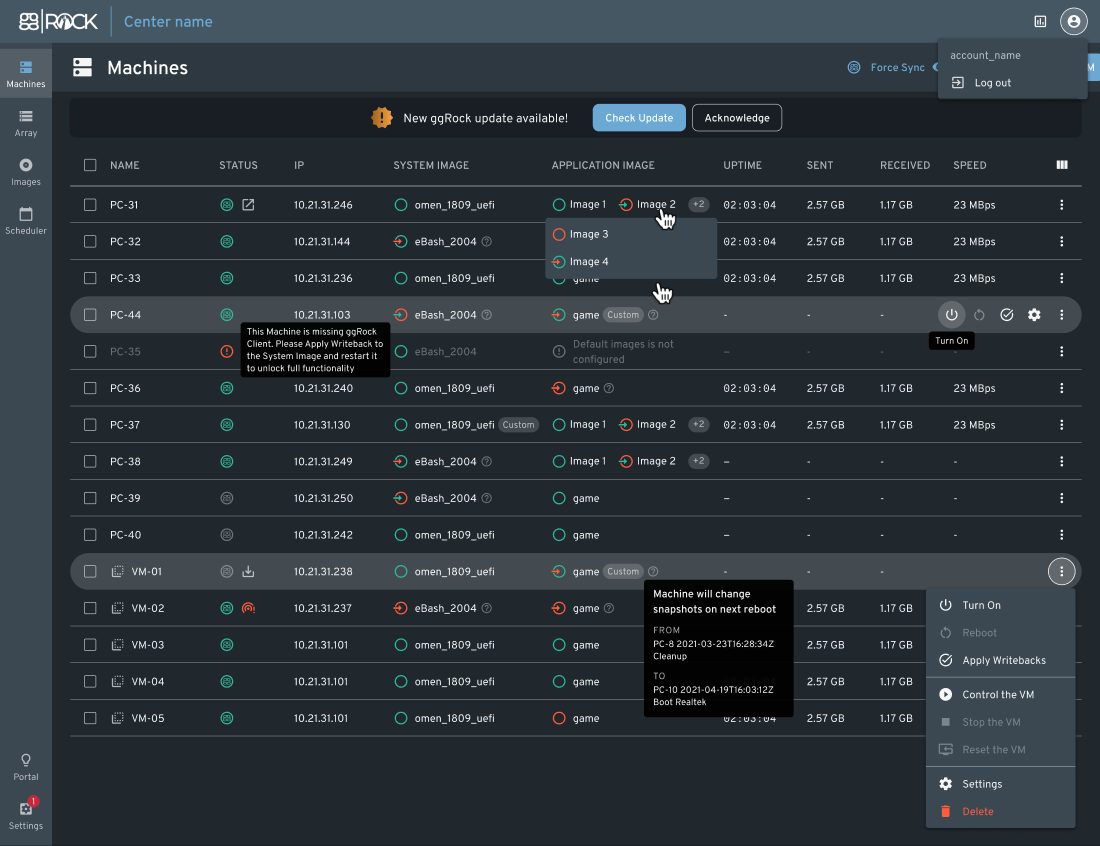
Every PC on the floor appears in one console. You can power machines on and off, reboot them, and monitor their network activity remotely. Each machine is assigned a disk image and a snapshot, and when you change something on one machine — a new game version, a settings tweak, a driver — you capture it as a snapshot and apply it to any or all of the others. The change you made once becomes the state every station boots into.
Images, Snapshots, Writeback, and Rollback
ggRock manages operating system and game images with a snapshot history behind each one. Writeback — the per-machine layer that holds session changes — is normally discarded on reboot, but you can enable keep-writeback for a specific PC when you want its changes to persist, for example while preparing an update. If a new snapshot causes problems, you roll back to the previous one, and retention settings control how much history the server keeps.
Seamless Boot for Mixed Hardware
A common failure point in legacy diskless setups is the new machine: a different network card, no matching driver in the image, no boot. Seamless Boot in ggRock detects the network adapter on a new hardware configuration and installs the required driver automatically, so one image can serve mixed generations of hardware as the venue grows or replaces machines.
Virtual Machines for Remote Maintenance
Game updates do not have to wait for a free physical PC. ggRock can boot an image as a virtual machine on the server, so you can install patches, test changes, and take snapshots without occupying a customer-facing station — or without being in the building at all.
Boot Scheduler, Active Directory, and Disk Arrays
A boot scheduler powers machines on ahead of opening hours so the floor is ready before the first customer arrives. Active Directory support fits ggRock into environments that manage identity centrally, which matters for schools and universities. Disk array management handles the storage layer on the server where images, snapshots, and writeback live.
Who Diskless Boot Software Is For
Esports venues and LAN centers are the obvious case: large game libraries, constant patching, and customers who expect every station to behave identically. Diskless booting keeps the whole floor on one version of everything and turns overnight game updates into a single snapshot operation instead of a station-by-station job.
Schools and universities run on the same mechanics for different reasons. Machines used by many students each day need to start every session clean, and revert-on-reboot enforces that without manual policing. Active Directory support lets a gaming lab fit the existing identity setup of the institution.
Multi-location operators benefit from repeatability. One master image per site means a new location can mirror a proven configuration instead of rebuilding it from scratch, and staff who learn the workflow at one venue can run it at any of them.
Where ggRock Ends and ggLeap Begins
ggRock handles infrastructure: what every PC boots, how images are updated, and how machines recover. It does not handle players, payments, or bookings — that is ggLeap, the venue management platform from ggCircuit. The two are built to run together and share computer names, hardware information, and configuration, so the machine you see in ggRock is the same machine ggLeap bills sessions on.
If you would rather not run the rollout yourself, the ggCircuit SpecOps Managed Services Team provides on-site installation support and daily game updates under a Managed Services Agreement, and 24/7 live chat support is available to every operator.
Start Your Free 30-Day Trial
Start with a free 30-day ggLeap trial — every feature, no credit card required — and talk to our team about pairing it with ggRock on your own hardware.
Frequently Asked Questions
Get Started with ggCircuit
Get more information about our esports solutions