ggRock vs CCBoot: Comparing Diskless Boot Platforms
ggRock and CCBoot are both diskless boot platforms designed to manage multiple gaming PCs from one centrally managed disk image. They help venues simplify PC deployment, updates, and maintenance compared with managing each machine individually.
When comparing ggRock and CCBoot, the key differences are not just feature lists but how each platform handles daily operations: image management, hardware changes, remote maintenance, integration with other venue systems, and support.
This guide compares these areas using documented platform capabilities. Features can vary between versions and editions, so confirm current details with each vendor before making a decision.
How the Deployment Models Differ
ggRock uses a diskless boot model where gaming PCs start from a centrally managed image stored on an on-premise server. Instead of maintaining separate installations on every machine, operators can update games, drivers, and system changes from one place.
By default, changes made during a session do not persist after reboot, helping keep stations consistent and ready for the next player. When needed, specific machines can be configured to retain changes through keep-writeback.
When comparing diskless boot platforms such as ggRock and CCBoot, consider how each handles images and snapshots management, hardware changes, remote maintenance, and integration with your venue operations. Alongside the boot model itself, ggRock includes the operational tooling a venue needs around it:
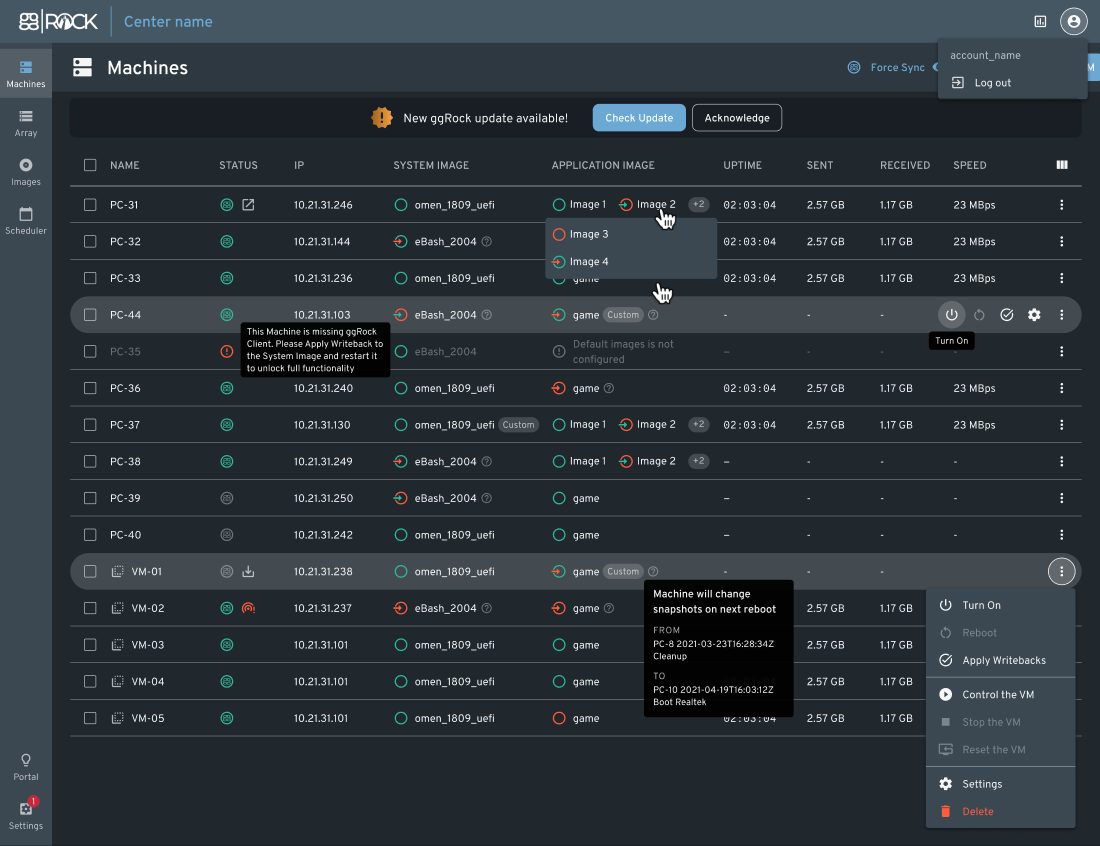
- Remote machine management, including power controls and network monitoring
- Image and snapshot management with per-machine configuration
- Boot scheduling for automated startup
- Active Directory support for centralized Windows account management
ggRock vs CCBoot across five diskless boot evaluation dimensions
| Evaluation dimension | ggRock | CCBoot |
|---|---|---|
Image and snapshot management | OS and game images with snapshots, per-PC keep-writeback, rollback, and retention settings; apply changes from one machine to others via snapshots | Varies by version and edition; verify with the vendor |
New-hardware handling | Seamless Boot automatically detects and installs NIC drivers for new hardware configurations | Varies by version; verify supported hardware with the vendor |
Remote maintenance | Virtual machines for image maintenance without launching a physical PC; remote power on, power off, reboot, network monitoring, and a boot scheduler | Varies by version; verify with the vendor |
Venue-management integration | Works with ggLeap, sharing computer names, hardware information, and configuration between the two platforms | Depends on the management software you pair it with; verify with the vendor |
Support and managed services | 24/7 live chat support from ggCircuit; SpecOps Managed Services Team offers on-site installation support and daily game updates under a Managed Services Agreement | Verify support channels and service levels with the vendor |
Competitor capabilities vary by product version, edition, and configuration. This table makes no claims about CCBoot features; always verify current functionality, pricing, and support terms directly with the vendor before making a decision.
The Five Evaluation Dimensions
Diskless boot platforms can look similar at a feature level, but the differences appear in daily operations. The comparison below focuses on the areas that affect maintenance, scaling, and reliability in a gaming venue.
Image and Snapshot Management
ggRock uses centrally managed images with snapshot-based change control. Operators can test changes, apply updates across machines, and roll back when needed, helping reduce downtime during game and system updates.
New Hardware Handling
Gaming venues often upgrade their hardware over time. ggRock's Seamless Boot helps new machines work with existing images by detecting required network drivers automatically, reducing manual setup when adding new PCs.
Remote Maintenance
ggRock provides tools for managing PCs without visiting each station, including remote power controls, network monitoring, boot scheduling, and virtual machine-based maintenance.
Venue Management Integration
The boot platform and venue management system need to work together. ggRock integrates with ggLeap so machine information stays aligned between infrastructure management and player operations such as accounts, sessions, and payments.
Support and Managed Services
ggCircuit provides 24/7 live chat support for ggRock. Venues that need additional help can use SpecOps Managed Services for installation support and ongoing game updates.
Migration Path from CCBoot to ggRock
Moving from one diskless boot platform to another requires planning. A typical migration involves setting up ggRock alongside your current environment, creating and testing a master image, validating hardware compatibility, and gradually moving PCs to the new boot system.
The rollout can be scheduled around your venue's operating hours to minimize disruption. For venues that need additional assistance, the SpecOps team provides installation support and managed services during the transition.
Making the ggRock vs CCBoot Decision
A fair ggRock vs CCBoot evaluation should focus on your venue's specific needs: hardware, game library, operating schedule, and existing software stack. Test the workflows that matter most, ask each vendor to demonstrate their approach, and consider how much maintenance you want your own team to handle.
Conclusion: A Diskless Platform for Gaming Venues
ggRock combines diskless boot management, image and snapshot control, hardware support, and venue-focused services with the wider ggCircuit ecosystem. When comparing ggRock and CCBoot, evaluate how each platform handles the workflows that matter most for your venue: deployment, updates, maintenance, integration, and support.
Start Your Free 30-Day Trial
Start with a free 30-day ggLeap trial — every feature included, no credit card required. Our team can also help you plan a smooth transition from CCBoot to ggRock.
Frequently Asked Questions
Get Started with ggCircuit
Get more information about our esports solutions