PC Reservation Booking System for Gaming Venues
A PC reservation booking system lets players pick a specific machine at your venue, book it for a time slot, and pay before they arrive. For operators, it turns peak hours into pre-sold inventory: you know who is coming, which seats are taken, and what revenue is secured before the doors open.
ggLeap, the esports venue management platform from ggCircuit, includes bookings as a built-in feature rather than a bolt-on. It auto-generates a player web portal for online reservations, feeds every booking into the admin calendar, and makes the reserved PC itself aware of the reservation on the day. This page explains how each piece works.
Why Bookings Should Live Inside Your Venue Software
Generic scheduling tools treat a reservation as a calendar entry. Staff have to match the entry to a physical seat, collect payment separately, and remember to hold the machine when the customer walks in. An integrated gaming lounge booking system removes those manual steps because the booking, the player account, the specific PC, and the payment are all records in the same platform.
- A booking is tied to a real player account, not just a name in a calendar
- The reservation targets a specific PC, so the seat is genuinely held
- Payment is captured at booking time through the integrated POS
- Staff and machines both see the reservation — nothing depends on memory
The Player Web Portal
ggLeap auto-generates a web portal for your venue — there is no website project to commission and no booking plugin to maintain. Players open the portal, create an account, and browse the game collection you actually run on the floor, so they can confirm a title is available before reserving a seat.
From there they choose a specific PC, pick a time slot, and pay online. Card payments run through the integrated Stripe-based POS in ggLeap, and customer payment details stay private — even from ggCircuit. Because the portal account is the same account players use to log in at the venue, their booking, session time, and purchase history all connect.
Admin Calendar Integration
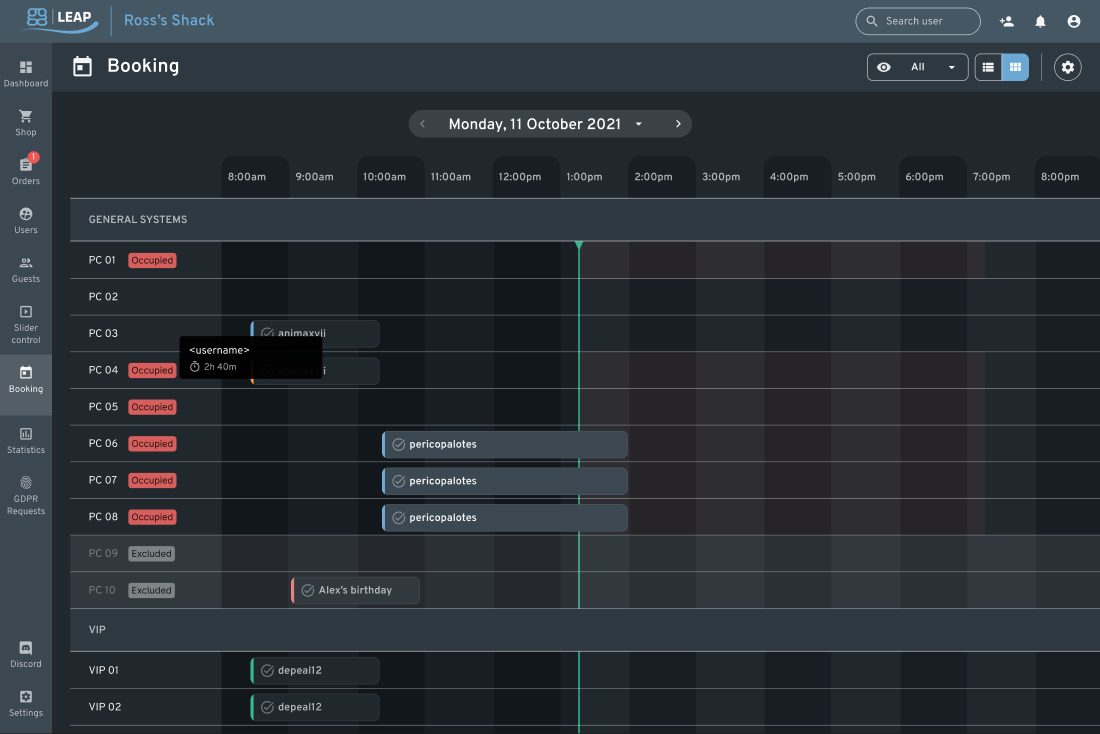
Every reservation made through the portal appears in the ggLeap admin calendar, alongside bookings your staff create at reception or over the phone. The front desk works from one schedule instead of reconciling an external booking tool against what is happening on the floor. Because administration in ggLeap is web based, you can review and manage upcoming bookings from anywhere, not just from a machine at the venue.
PCs That Know They Are Reserved
The detail that separates a true PC reservation booking system from a shared calendar is what happens at the machine. In ggLeap, the booked PC is aware of its reservation on the day. That protects the booking in practice: a walk-in customer cannot quietly occupy a seat that a paying customer reserved for 7 PM, and staff do not have to police the floor with a printout. The reservation is enforced where it matters — at the station itself.
Embed Bookings in Your Existing Website
Most venues already have a website, and customers should not be sent to an unfamiliar domain to book. The ggLeap player portal can be embedded directly into your existing site via iframe, so booking lives on the pages you already rank for and promote. Venues without a site can use the auto-generated portal on its own — either way there is no custom development required to start taking online reservations.
Group and Event Bookings
Single-seat reservations are only part of the business. Birthday parties, team practice blocks, school visits, and watch parties all need several machines held at once. ggLeap supports group and event bookings, so you can reserve a block of PCs for one customer or organization, keep that capacity off the walk-in floor, and see it reflected in the same admin calendar as everything else. For venues running leagues or recurring community nights, that makes weekly capacity planning a scheduling task instead of a negotiation at the front desk.
Bookings Connected to the Rest of Your Operation
Because bookings are one feature of a complete venue management platform, a reservation flows naturally into a session. The player checks in, the session is tracked and billed against their account, and any food, drinks, or merchandise land on the same integrated POS. Loyalty features — memberships, digital coupons, and a configurable coin economy — give booked customers reasons to return.
The same PC reservation booking system scales beyond a single gaming lounge: ggLeap supports multi-location operations with centralized reporting and is used by universities, schools, and hotels as well as dedicated gaming centers. Operators get 24/7 live chat support from ggCircuit, plus guided setup when starting out.
Start Your Free 30-Day Trial
Test ggLeap free for 30 days — every feature included, no credit card required — and run real bookings, sessions, and POS on your own floor before you commit.
Frequently Asked Questions
Get Started with ggCircuit
Get more information about our esports solutions